
Product Updates (2/21/24)
Today we released an important GoTab POS app update. At the end of service today (Wed 2/21) or before service starts tomorrow (Thu 2/22), please update both the GoTab POS app and the NYC1. The updates addressing the following aspects of payment processing on Adyen.
-
NYC1 USB Connectivity: This updates enables an NYC1 to directly connect to your CFD or POS via USB. Previously, Bluetooth was the only connection available to process payments with an NYC1.
-
Broader Support for Tap To Pay: This Adyen required update will help allow GoTab to turn on Tap To Pay globally, rather than purely by request per location.
-
Pending authorization bug fix: Adyen has completed a bug fix that caused some authorizations on credit cards to hold for an extra business day.
How to Update GoTab POS App
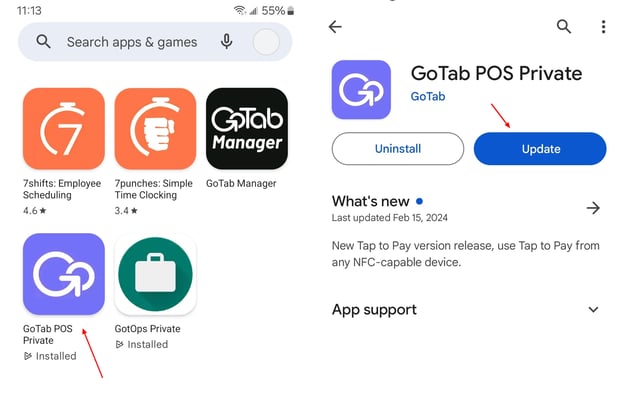
On both POS and/or CFD, navigate to the Play Store—GoTab POS or POS Private—Update.
Update NYC1 Firmware
Notes: This can only occur once the above GoTab POS app update is complete. Firmware update via Bluetooth can take 5-10 minutes. Via USB, the update can complete in as little as 1-2 minutes.
If the NYC1 is paired directly to the POS, navigate to More–Settings–Pair Payment Device
If NYC1 is paired to a CFD, in POS navigate to More–Settings–Configure CFD Settings. Now on CFD itself, tap “Pair Payment Device” and the remaining steps are the same.
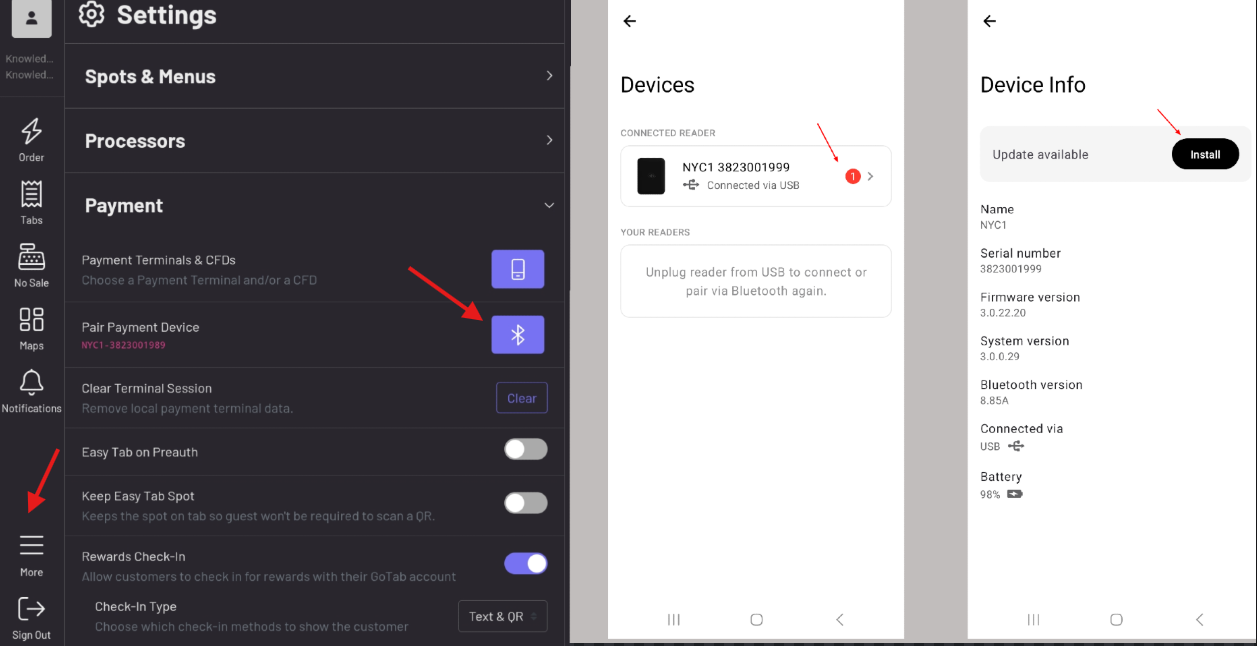
Tap the red dot indicating a firmware update is available for the NYC1
Tap Install
Once installed, the NYC1 will beep indicating that the install is complete, and you are now fully up-to-date!